




What a trip expense book records
A book for the trip
Name the book after the trip, such as Summer trip. It is its own tab, apart from your home money. When the trip is over, archive the book and restore it later if you need it.
Cash in and cash out
Record the money the group puts in as cash in, and each cost as cash out. The book keeps a running balance, so you always see what is left.
Who paid
Every entry says which member paid, and reports can be grouped by member.
Add entries without a signal
New entries wait on your device and go into the sheet when the connection is back. The app retries on its own and does not make duplicates.
One currency per space
A space has one currency. If the trip uses a different currency from home, give it its own space.
Bills and a statement at the end
Photos of bills go with each entry: see the expense tracker with receipts. When the trip ends, a PDF statement closes it.
A good fit: You want one shared record of what the group put in, what each cost was, who paid it, and what is left.
Not the best fit: You want the app to divide the bill and tell people who owes whom. Splendly does not settle up. For how people share a space, see the shared expense tracker.
Set up the trip book
- 1
Pick the space
Use your home space or make a new one. A space has one currency, so if the trip is in a different currency, make a new space for it.
- 2
Create the trip book
Add a book named after the trip. It becomes a tab in your Google Sheets™ file, with its own list and balance.
- 3
Add the travellers
Add friends by Google email as editors, or as viewers if they should only look. Each person opens the space once with Google's file picker. How sharing works.
- 4
Put money in, then record each cost
Record each contribution as cash in and each cost as cash out. Choose the member who paid, a category, and how it was paid: cash, card, bank, UPI or other.
- 5
Finish with a PDF
At the end, open Export PDF, choose the dates and the book, and press Make PDF. On the web the file downloads. On Android™ it goes to your phone's share sheet. More on the PDF statement.
See it on screen
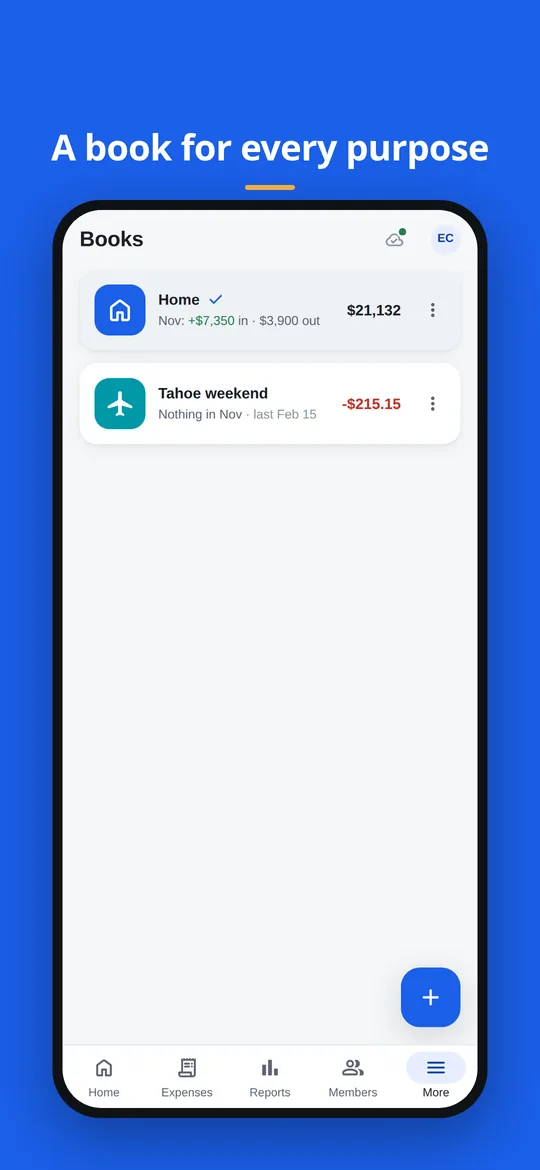
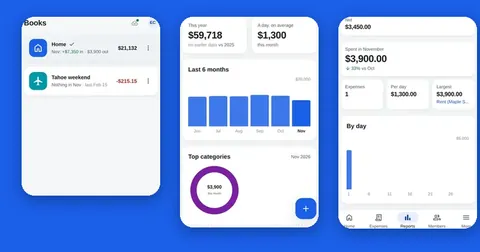
A trip sits beside your other books, each with its own balance. 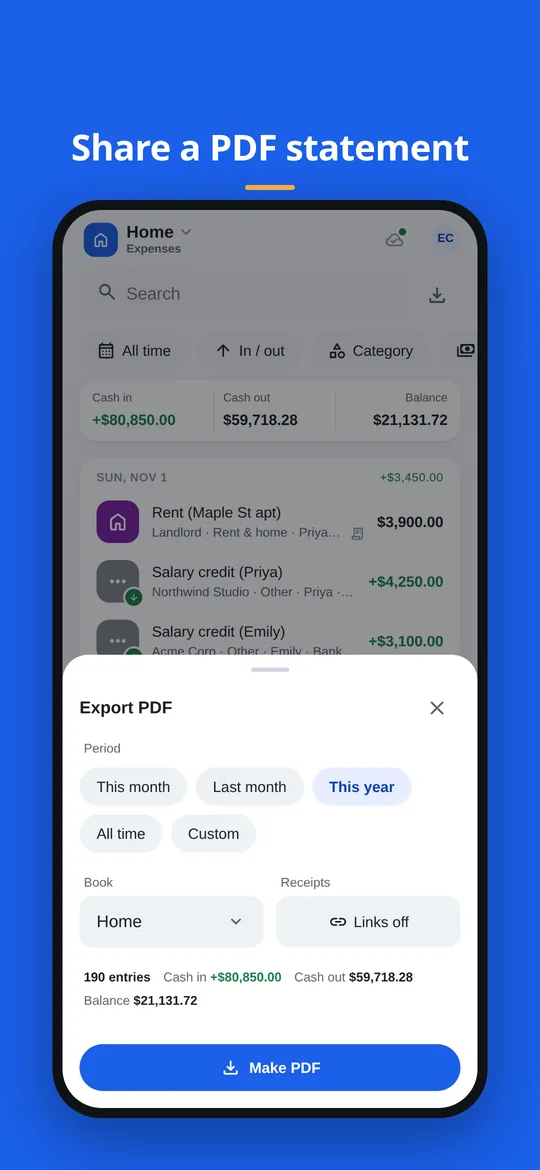
Export PDF: choose the dates and the book, then press Make PDF.
A small example of a trip book
Four friends put money in and spend it over five days. The last column is the running balance the book shows after each entry.
| Day | Entry | Cash in | Cash out | Balance left |
|---|---|---|---|---|
| Day 1 | Each of four friends puts in 100 | 400 | - | 400 |
| Day 1 | Hotel deposit | - | 150 | 250 |
| Day 2 | Fuel | - | 40 | 210 |
| Day 3 | Dinner for everyone | - | 85 | 125 |
| Day 5 | Boat tickets | - | 90 | 35 |
Example, not real data.
Good to know
- A space has one currency, and Splendly does not mix currencies inside one space. If the trip uses a different currency from home, give it its own space.
- Members see a space only after opening it once with Google's own file picker. Set this up before you travel, while everyone has a connection.
- Entries added offline reach the sheet only when the connection is back, so other people see them after that.
- The PDF writes every amount with its currency code, for example USD 1,234.00, and letters outside the Latin alphabet in notes may print as ?. Check the PDF before you send it.
- Splendly does not settle up. It has no unequal splits and does not record payments between people.
Questions people ask
Can everyone on the trip add expenses?
Yes, if the owner adds them as editors. The owner types each person's Google email and chooses editor or viewer. Viewers can follow the book but cannot change anything.
How does a group record the money it puts in?
Record it as cash in. The party field can say who it came from, up to 80 characters, and the note can say what it is for. Each cost after that is a cash out entry, and the balance shows what is left.
How does a group split the cost of a trip?
Splendly does not settle up: it has no unequal splits and does not record payments between people. It records what went in, what was spent, who paid each entry and what is left. The Members report compares what each person paid in a year with an equal share of the total.
Can I see who paid each entry?
Yes. Every entry records the member who paid. Open Reports and choose the Members tab to group by member, or search and filter the list by member.
Does it work without internet while travelling?
You can add new entries. They wait on your device and go into the sheet when the connection is back. The app retries with a growing pause and does not create duplicates. If the app has had no connection at all for about a week, it asks you to go online once so it can check that its version is still supported. Your waiting entries are kept.
Where do the photos of bills go?
On Android™ you take a photo or choose one from the gallery. On the web you pick a file. A PDF or an image also works. The file is saved in a folder in the uploader's own Google Drive™. More on receipts.
What is in the PDF statement?
The opening balance, cash in, cash out and closing balance, a running-balance table, and summaries by category and by who paid. You choose this month, last month, this year, all time or your own dates, and one book. See the PDF guide.
What if the group pays in two currencies?
Currency is chosen for each space, and one space cannot hold two. Keep one space for each currency. Amounts are stored exactly, in whole minor units, never as rounded decimals.
Do the others need to install anything?
Each person uses Splendly with their own Google sign-in, in a web browser now, and on Android™ 7 or newer soon. There is no iPhone or iPad app. You can try it first with sample data, which needs no sign-in.
Google Sheets, Google Drive, Android and Google Play are trademarks of Google LLC. Splendly is not affiliated with or endorsed by Google.