




01Who we are
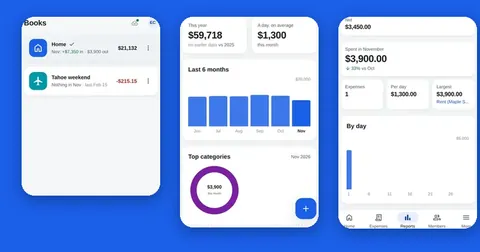
Splendly is made by Codeinate. The product page is at https://www.codeinate.com/splendly/. This policy covers the Android™ app and the web app. They are the same app with the same sign-in and the same books.
Questions about this policy or help with the app: support@codeinate.com.
02The short version
Your entries and receipts live in your own Google Drive™, in a Google Sheet™ and a folder that you own. There is no Splendly account, no password and no Splendly database.
Your phone or browser talks to Google directly, with your own Google sign-in. Splendly has no server that receives your entries, amounts, receipts or sign-in token.
There are no ads in Splendly and we do not sell your data. Anonymous usage stats are OFF until you say yes, and they never include your entries (see "Optional anonymous usage stats" below).
03Google user data
Splendly asks Google for two things. First, your name, email address and photo, to sign you in and to show who paid. Second, access to files in Google Drive™ that Splendly creates itself, and to files you pick yourself with Google's file picker. This is the drive.file permission.
Splendly does not ask for access to all your Google Sheets™ or all your Google Drive™ files. It cannot see a file it did not create or that you did not pick.
What it does with that access: it creates one Google Sheet™ for each space, with a tab for each book, and a folder for receipts; it reads and writes rows in that sheet; it saves the receipt photos and files you attach into the folder; when you add a member it shares the sheet with that person's Google account; and when you attach a receipt it shares that file with the other members of the space at that moment.
The data is used only to give you the features described on this page. It is not used for advertising, and it is not given to anyone else, except the people you choose to share a space with.
Google's own handling of your account, Google Sheets™ and Google Drive™ is covered by Google's privacy policy.
04What the app keeps on your device
In the app's own storage on your phone or browser: a copy of the space you have open, the new entries that are waiting to be sent while you are offline, your preferences such as the theme, and your Google sign-in token.
The token stays on your device. Signing out removes your sign-in from this device. The copy of the space and any entries still waiting to be sent stay in the app's storage, so nothing you typed is lost, and your preferences stay too. They are removed when you uninstall the app, clear its storage, or sign in with a different Google account.
05What reaches our hosting provider
If you use the web app, your browser loads the app itself from splendly.codeinate.com. Like any website, that request reaches our hosting provider, Amazon Web Services (CloudFront), with your internet address and device information.
Both apps ask us for a small public file named gate.json, about once a day, and again every hour while the app cannot reach it. It tells the app whether its version is still supported, and where the live-update and usage-stats services described below are.
We run no ad kit, and we do not switch on access logs.
06Live updates
When two or more people use the same space, a small live-update service in our Amazon Web Services account (AWS AppSync, region us-east-1) tells their other devices that something changed, so a new entry shows up within a second or two.
It receives only: a random room code (kept in your space's own settings tab, so only people who can open the sheet know it), a random tag for the sending device, the kind of change (for example "entry added") and a random id of the entry. It never receives names, email addresses, amounts, notes, categories, the id of your sheet or your Google sign-in token. It stores nothing, writes no log and replays nothing. The other devices then read the change from Google, with their own sign-in.
The app does not check for changes on a timer. A space refreshes when such a message arrives, when you open the app or bring it to the front (at most once every 30 seconds), when your connection comes back, or when you tap the sync icon. When you remove a member, the space gets a new room code first.
07Optional anonymous usage stats
Off until you say yes. After your first entry the app asks once, in plain words, and you can change your answer at any time in Settings under Anonymous usage. Nothing is collected, kept or sent before you say yes.
If you say yes, the app sends which screens and features are used, as fixed words, for example "expenses screen opened", "entry added: cash out, with receipt" or "error: network". It also sends a random install id (made only after your yes and forgotten when you turn this off), the app version and whether it is the web or Android app. It never sends your entries, amounts, names, emails, notes, categories, book names, sheet or file ids, search words, receipts or your sign-in token. The complete list is on the What is shared page.
The stats go straight from your phone or browser to Google Analytics, in our own Analytics property. Because the request goes to Google, Google Analytics also sees the connection, for example the approximate country from your internet address; according to Google it does not store IP addresses. We store nothing ourselves. If you turn this off, nothing more is sent.
08Camera and receipts
The camera permission is asked for only when you tap Take a photo to add a receipt. On the web you pick a file instead.
A receipt is a photo, or a PDF or image file. Large photos are made smaller before they are saved. The file is saved in a folder in the Google Drive™ of the person who added it, and the entry links to it. The members of the space at the time the receipt was added open it through that Google Drive™ link.
10What Splendly does not have
There is no bank connection in Splendly: no bank login and no bank sync. You type each entry yourself.
There are no ads, no in-app purchases and no analytics. Splendly does not sort entries into categories for you, and it does not read your receipts.
11Third parties
Google (sign-in, Google Sheets™, Google Drive™, and Google Play™ for the Android™ app) and Amazon Web Services (the hosting of the web app and of the public version file). No analytics kit, no ad kit, no data brokers, no sale of data.
12Children
Splendly is a finance app and is not directed at people under 18.
13Deleting your data
Stop using Splendly any day. Open myaccount.google.com/permissions, choose Splendly, then choose Remove access. After that, Google stops accepting Splendly's sign-in, so the app can no longer read or write your files.
Sign out of the app to remove your sign-in from that device. To also remove the copy of the space and any waiting entries, uninstall the app or clear its storage in your phone or browser settings.
Your sheets and receipts stay in your Google Drive™ and keep working as a spreadsheet and a folder. To delete the data, delete the sheet and the receipts folder in Google Drive™, then empty the bin. Nothing needs deleting on our side, because we hold none of it.
Step by step: https://www.codeinate.com/splendly/delete-account/
14Changes to this policy
When this policy changes, the date at the top changes with it. If a change matters to how your data is handled, we say so plainly on this page.
15Contact
Questions or help: support@codeinate.com. Codeinate, https://www.codeinate.com/.
Google Sheets, Google Drive, Android and Google Play are trademarks of Google LLC. Splendly is not affiliated with or endorsed by Google.