




What Splendly does not ask for
No bank connection
Splendly does not link to a bank or a card. There is no bank sync, so there is nothing to connect, and nothing to disconnect at your bank later.
No Splendly account
You sign in with Google. There is no Splendly password and no Splendly list of users to leak.
Your data is a Google Sheet™
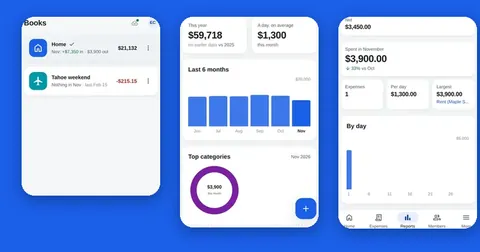
Entries, books, members, categories and the activity log are rows in a sheet in your own Google Drive™. Receipts are files in your Drive. Both belong to you.
Only the files it needs
Splendly asks Google for the files it creates and the ones you pick, plus your name, email and photo for sign-in. It does not ask for all your spreadsheets or all your Google Drive™ files.
No Splendly server for your entries
The app talks to Google directly from your device, with your own sign-in. No Splendly server receives your entries, amounts, receipts or sign-in tokens.
Usage stats are off until you say yes
Optional anonymous usage stats stay off until you choose yes, and you can turn them off at any time. What Splendly shares.
A good fit: You want a tracker you type into yourself, with your data in a file you own and can walk away with.
Not the best fit: You want money to arrive on its own from your bank. Splendly has no bank connection, so every entry is typed by a person.
See and remove its access yourself
- 1
Open your Google account permissions
While signed in to the account you used for Splendly, open myaccount.google.com/permissions.
- 2
Find Splendly in the list
Open it to see what it can use: the files it created or you picked, plus your name, email and photo.
- 3
Remove access if you want to
Remove Splendly's access. The app can no longer open your sheet until you sign in with Google again.
- 4
Keep or delete your data
Your sheet and your receipts stay in Google Drive™ as normal files. To delete the data, delete the sheet and the receipts folder in Google Drive™. Nothing needs deleting on Splendly's side.
What Splendly does see
Honest answers are short. These are the only things that reach Splendly's own systems, and none of them carries your entries.
- A small public file, gate.json, that the app downloads from splendly.codeinate.com to learn whether its version is still supported. It has no personal data in it, and the app asks at most about once a day. Like any web request, it reaches Codeinate's hosting provider, Amazon Web Services, with your IP address.
- When two or more people share a space, a small live-update service passes a "something changed" message between their devices. It receives a random room code, a random device tag, the kind of change and a random id of the entry. It never receives names, emails, amounts, notes, categories, sheet ids or your sign-in token. It stores nothing and logs nothing.
- Only if you say yes: anonymous usage stats, with event names such as which screen was opened. They go straight from your device to Google Analytics. Never entries, names, emails, amounts or notes. Turning it off stops everything at once.
Where each piece of data lives
| What | Where it lives | Who owns it |
|---|---|---|
| Entries, books, members, categories, activity log | Rows in a Google Sheet™ in your Drive | You |
| Receipts | A folder in the Google Drive™ of the person who added them | You |
| Sign-in token and a copy of the open space | On your own device, in app storage | You |
| Entries waiting to be sent while you are offline | On your own device | You |
| Anonymous usage stats (only if you said yes) | Google Analytics, event names only | Codeinate |
Good to know
- Signing out removes only your sign-in and asks Google to revoke it. The copy of the space and any entries still waiting stay on the device until the app is uninstalled, its storage is cleared, or a different Google account signs in.
- A member sees a shared space only after opening it once with Google's own file picker. That is Google's per-file permission, not a Splendly choice.
- If you remove a member, Splendly asks Google Drive™ to unshare the sheet. Receipts already shared with them stay open to them until the person who uploaded each file stops sharing it in Google Drive™.
- Splendly makes no claim of end-to-end encryption, and it is not a bank. It is a record you keep in your own Google account.
Questions people ask
Does Splendly ask for my bank login or card number?
No. Splendly has no bank connection and never asks for bank details, a card number or a password of its own. You sign in with Google.
Can Splendly see my bank balance or my transactions?
No. It cannot see your bank at all. Every entry in Splendly is typed by a person in your space, so the app only knows what you or your members enter.
Where is my data stored?
In your own Google account. Entries are rows in a Google Sheet™ in your Google Drive™, and receipts are files in a folder in your Google Drive™. Splendly has no database of its own for them.
Does Codeinate, the company behind Splendly, see my entries?
No. The app talks to Google's services directly from your device with your own sign-in. There is no Splendly server that receives entries, amounts, receipts or sign-in tokens.
Which Google permission does Splendly use?
It uses access to the files the app created or you picked, plus your name, email and photo for sign-in. It does not ask for access to all your spreadsheets or all your Google Drive™ files.
Does Splendly show ads or track me for advertising?
No. Splendly shows no ads and has no ad kit. Optional anonymous usage stats are off until you say yes, and they never include your entries.
What happens if I sign out?
Your sign-in is removed and Google is asked to revoke it. The copy of your space on the device stays until the app is uninstalled, its storage is cleared, or another Google account signs in.
How do I stop using Splendly and delete everything?
Remove Splendly's access at myaccount.google.com/permissions, then delete the sheet and the receipts folder in Google Drive™. Nothing needs deleting on Splendly's side. Delete your data has the steps.
Google Sheets, Google Drive, Android and Google Play are trademarks of Google LLC. Splendly is not affiliated with or endorsed by Google.