




What you will build
One simple table
Date, category, note, amount and balance. One row per expense or payment received.
A running balance
One formula, copied down, shows what is left after every row.
Totals by category and by month
Two short formulas add up what you spent on groceries, or in November, without any manual sums.
Shared when you want
Share the sheet with the people who add entries, as editors, or as viewers who can only look.
A good fit: You are tracking your own money, or a small shared pot, and you like to understand every cell.
Not the best fit: Many people add entries from their phones, you need receipts next to each entry, or you want reports and a PDF without building them. For that, see Splendly.
Build it in six steps
- 1
Make the sheet
Open Google Sheets™ and start a blank sheet. In row 1 type these headings, one per column: Date, Category, Note, Amount, Balance.
- 2
Decide how to write money in and money out
Type money you spend as a negative number, for example -12.50, and money that comes in as a positive number, for example 300. Then every sum works without extra rules.
- 3
Add the running balance
In cell E2 type
=SUM($D$2:D2)and press Enter. Copy that cell down the column. Each row now shows the total of every amount from row 2 down to that row. - 4
Add totals by category
Make a second tab called Totals. In column A list your categories. In B2 type
=SUMIF(Sheet1!$B:$B, A2, Sheet1!$D:$D)and copy it down. It adds the amounts of every row whose category matches. - 5
Add a total for one month
In any empty cell type
=SUMIFS(Sheet1!$D:$D, Sheet1!$A:$A, ">="&DATE(2026,11,1), Sheet1!$A:$A, "<"&DATE(2026,12,1)). Change the two dates to the month you want. The result is the net of that month. - 6
Share it
Press Share, add the email addresses of the people who should add entries, and give them Editor access. Give people who only need to look Viewer access.
When an app on top of the same idea makes sense
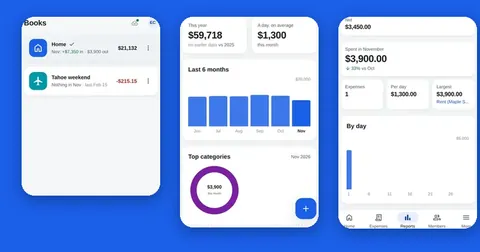
Splendly keeps the same idea: your entries are rows in a Google Sheets™ file in your own Google Drive™. On top of it the app gives you a form for each entry with a category picker, a running balance for every book, receipts attached to entries, owner, editor and viewer roles, an activity log, reports and a PDF statement. New entries also wait on your phone when there is no signal.
- It does not connect to a bank, and it has no budgets or reminders.
- It does not split bills or say who owes whom.
- You can try it with sample data first, without signing in. Try Splendly.
What the table looks like (made-up numbers)
These rows are an example, not real data.
| Date | Category | Note | Amount | Balance |
|---|---|---|---|---|
| 2026-11-01 | Salary | November pay | 3000.00 | 3000.00 |
| 2026-11-02 | Groceries | Weekly shop | -64.80 | 2935.20 |
| 2026-11-03 | Rent | November rent | -1200.00 | 1735.20 |
| 2026-11-04 | Fuel | Tank | -42.30 | 1692.90 |
Where a hand-made sheet starts to hurt
- Formulas live in cells, so anyone with edit access can overwrite one by accident. One changed cell can shift every balance below it.
- Sorting or deleting rows can break formulas that were not set up with care. Check the balance after you change the order.
- Typing into cells on a phone is slow, and there is no category picker, so categories drift (Groceries, groceries, Grocery).
- A receipt has to be uploaded to Google Drive™ and its link pasted into the row by hand.
- Google Sheets™ keeps a version history, but there is no list of who changed what next to each entry.
- None of this is wrong. It is the price of building it yourself, and for one person it is often a fair price.
Questions people ask
What is the simplest expense tracker in Google Sheets?
A table with five columns: Date, Category, Note, Amount and Balance. Type spending as negative numbers and income as positive numbers, and use =SUM($D$2:D2) in the Balance column.
How do I add up expenses by category in Google Sheets?
Use SUMIF. For example =SUMIF(Sheet1!$B:$B, "Groceries", Sheet1!$D:$D) adds every amount in column D whose category in column B is Groceries.
How do I get the total for one month?
Use SUMIFS with two date conditions: =SUMIFS(Sheet1!$D:$D, Sheet1!$A:$A, ">="&DATE(2026,11,1), Sheet1!$A:$A, "<"&DATE(2026,12,1)). Change the dates to the month you need.
Can two people use the same expense sheet?
Yes. Press Share and add them as Editors. Anyone with Editor access can change any cell, including the formulas, so many people choose Viewer access for those who only need to look.
Can I track expenses on my phone with Google Sheets?
Yes, with the Google Sheets™ app or a browser. It works, but typing into cells is slow and there is no category picker. An app such as Splendly gives you an entry form instead.
How do I keep receipts with my expenses?
Upload the photo or PDF to Google Drive™, copy its link, and paste the link into the row. With Splendly the receipt is attached to the entry and saved in a folder in your Google Drive™.
Do I need Splendly to track expenses?
No. A hand-made sheet works well for one person. Splendly is for when many people add entries, when you want receipts, roles and reports without building them, or when you add entries from a phone.
Google Sheets, Google Drive, Android and Google Play are trademarks of Google LLC. Splendly is not affiliated with or endorsed by Google.