




What to compare
How entries get in
By hand, from a file, or from a bank feed. Typing is slower, but you decide what every line says.
Who holds the records
Paper in a drawer, a file you own, or a company's database. This decides what you can take with you.
Who can add or look
A notebook is one copy. A shared sheet or app lets several people add, and good ones let some people only look.
A bill for each payment
A bill pinned to a page, or a file linked from the entry. Ask whether you can open the bill from the line it belongs to.
Leaving later
Check what happens to your records the day you stop. A file you own stays yours.
Where it runs
A phone, a browser or both. Check this before you hand it to the people who will use it daily.
Choose in four questions
- 1
Decide how entries will arrive
If you want a bank to fill in transactions, choose a bank-linked app. If you are happy to add each cash in and cash out yourself, any other kind can work.
- 2
Decide who adds and who only looks
For one person, a notebook or a plain sheet is enough. For several people, look for roles such as owner, editor and viewer.
- 3
Decide where the records should live
For a file you own, choose a tool built on a sheet. If a company may host them, hosted software is an option.
- 4
Decide what you must be able to show
If someone will ask for a statement with an opening and closing balance and the bills behind it, check the tool can make one.
See it on screen
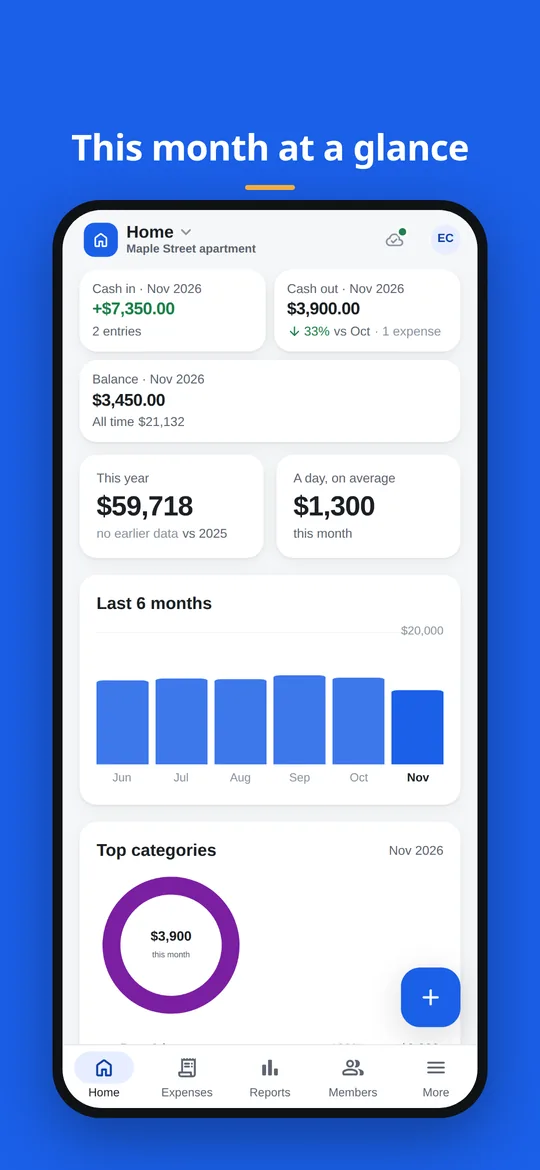
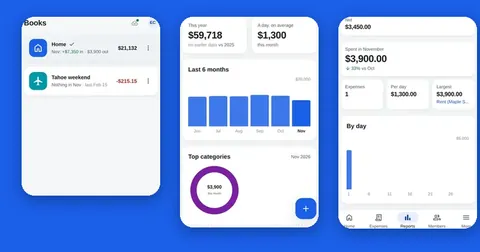
The home screen: this month's cash in, cash out and balance, a six-month chart and the top categories.
Five kinds of expense tracker side by side
Each kind does one job well. Read the second column first.
| Kind of tool | The better choice when | How entries arrive | Where the records live | Weak spot |
|---|---|---|---|---|
| Paper notebook | You have a handful of entries and want no setup at all | You write each line and add up by hand | On paper, in one place | Easy to lose, hard to search, and there is only one copy |
| Plain spreadsheet template | You like formulas and want full control of the layout | You type each row | In your own file | You maintain the formulas, sharing and bills yourself, and typing rows on a phone is slow |
| Bookkeeping software | You need full accounts for a business, not only a record of cash in and cash out | Typed, imported or fed from a bank, depending on the product | Often on the provider's servers | More to learn and set up than a simple cash book needs |
| Budgeting app linked to your bank | You want transactions to appear by themselves | Pulled from the bank accounts you link | Often on the provider's servers | Cash payments still need typing, and it works with the banks the product supports |
| Splendly | You want to add entries yourself in a sheet you own, with receipts and shared books | You add each entry. There is no bank link | In a Google Sheets™ file in your Google Drive™, with receipts in your Google Drive™ | No bank sync, no AI and no iPhone app |
Products inside each kind differ a lot, so check the one you are considering.
Good to know
- Splendly has no bank connection and no bank sync. Every entry is added by you.
- It has no AI, no automatic categorisation and no receipt scanning. You choose the category and type the amount.
- Splendly is made for Android™ and for any modern web browser. There is no iPhone or iPad app and no desktop app.
- It has no budgets, no reminders, no sub-accounts and no approval flows.
- Each space has one currency.
- A member sees a shared space only after opening it once with Google's own file picker.
Questions people ask
What is the simplest alternative to an expense tracker app?
A paper notebook. It needs no setup and no screen, which is why it is the better choice for a few entries. It cannot search, add up on its own or be shared.
Is a spreadsheet template better than an app?
It is better when you enjoy formulas and want to design every column. An app gives you ready screens for adding, searching and sharing. Splendly sits between the two: your data is a Google Sheet™ you own, and the app supplies the screens.
When do I need bookkeeping software instead?
When you need full business accounts and not just a record of cash in and cash out. Splendly is a cash book. It has no sub-accounts and no approval flows.
When is a bank-linked budgeting app the better choice?
When you want transactions to arrive without typing them. Splendly cannot do that, because it has no bank connection and no bank sync.
Why would I pick Splendly over those?
If you want to add your own entries, keep the records in a Google Sheet™ you own, attach receipts that live in your Google Drive™ and share books with roles. There is no Splendly account, no ad and no in-app purchase.
Does Splendly work on an iPhone?
Splendly works in any modern web browser now, and an Android™ app (7 and newer) is coming soon. There is no iPhone or iPad app, and no desktop app.
Does Splendly use AI to sort my expenses?
No. There is no AI, no automatic categorisation and no receipt scanning. You pick the category and enter the amount.
Can I leave Splendly later without losing my records?
Yes. Your books are a Google Sheets™ file in your Google Drive™, and your receipts are files in your Google Drive™. They keep working as normal files if you stop using Splendly.
Google Sheets, Google Drive, Android and Google Play are trademarks of Google LLC. Splendly is not affiliated with or endorsed by Google.