




Who it is for
Home bakers, makers and small food sellers
Take orders for next Saturday, see a prep list for each day, and tell people the earliest day you can deliver.
Small shops that live in a spreadsheet already
Keep your product list in a Sheet. Stock, prices and orders show up in the shop without copying anything.
Sellers who do not want a monthly platform fee for their shop data
The shop's data sits in your Google account, not on a platform that can hold it back.
Three steps to a live shop
- 1
Copy the template
Copy the template Sheet into your own Google Drive™. It already has the tabs the shop needs.
- 2
Tick the permission boxes
Google asks you to allow the shop to work in your Sheet. Tick every box on Google's screen, or part of the shop will not work.
- 3
Press Publish
A short checklist tells you what is still missing (products, payment details, policy pages). When it is all green, press Publish and share your shop link.
What you get
A site editor
Change the words and pictures on your pages by double-clicking them in the preview. Pick a look, an accent colour, corner style and product grid.
Orders
Orders arrive in your Sheet and on an Orders screen. Mark paid, mark packed, add a tracking number, edit an order or record a refund.
Products, options and stock
Colour and size options (up to 30 combinations, each with its own price and stock). Facts such as allergens, weight and how long it keeps.
Coupons
Make a coupon code and see how it prices a sample cart before you share it.
Delivery days
Set days to prepare, an order-by hour and the weekdays you are closed. Shoppers pick a day from the days that work, and you get a prep list for each day.
Invoices and messages
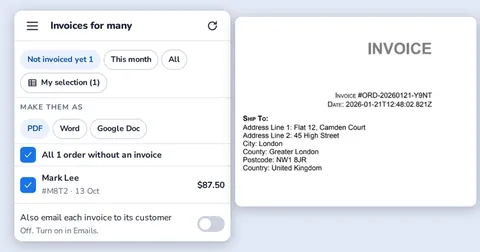
An invoice is made when you mark an order paid, with numbers in order and no gaps. Ready-made messages for ready, out for delivery, late, payment and thanks.
Tracking for shoppers
A shopper types the order number and email to see where the order is. No account needed.
Accountant file
Download one month of orders as a CSV with money, tax, payment and invoice numbers.
Your data stays in your Google account
Codeinate does not hold your shop's customers or orders. They are in your Sheet.
Honest limits
- Shoppers cannot pay by card inside the shop. You can offer bank transfer, a payment link you already use, or cash on delivery.
- An order is a request. You confirm it, and you mark it paid when the money arrives.
- Search in the shop is simple. It finds words in product names, not typing mistakes in every case.
- The shop reads your Sheet through Google, so a change can take about a minute to show on the shop.
- Google sets daily limits on mail and work for every account. The shop keeps a reserve so sign-in codes can always be sent.
- Prices for the service are not decided yet, so none are shown here.
Questions
Do I need to know how to code?
No. You copy a template, tick the permission boxes and press Publish. The editor and the Orders screens do the rest.
Where are my customers and orders kept?
In your own Google Sheets™ file in your own Google Drive™. You are the one in charge of that data.
What does Codeinate see?
Your sign-in email, the name of your shop address, your plan and billing details, and anonymous server logs. Not your customers' details.
Can shoppers pay online by card?
Not inside the shop. Orders can be paid by bank transfer, by a payment link you set up, or in cash on delivery.
What happens if Google is busy?
The shop says it is busy and asks the shopper to try again. Nothing is lost, and a double tap is one order, not two.
What if I change my Sheet by hand?
That is allowed. The Shop menu has a Check my Sheet button that finds missing tabs, prices typed as text and repeated order numbers.
Can I get my data out?
Yes. It is your Sheet. You can also download a month of orders as a CSV and download or delete one shopper's data.
Is Sellnest made by Google?
No. Google Sheets™ and Google Drive™ belong to Google LLC. Sellnest is an independent product.
Google Sheets™, Google Drive™, Gmail™ and Google Apps Script™ are trademarks of Google LLC. Sellnest is not affiliated with or endorsed by Google. Codeinate is a member of Google Cloud™ Partner Advantage.
Documentation · Privacy · Terms · Cookies · Delete your data · Contact